
Forum Replies Created
-
AuthorPosts
-
support
KeymasterWe do provide toolchains for the most common targets (Raspberry Pi, STM32MP1) free of charge.
If you believe that Variscite should be sponsoring a toolchain for their target, feel free to contact them and convince them to do so. We are fine either way, as long as someone agrees to cover the research, porting and testing costs.
KeymasterHi,
The embedded toolchains usually need to be individually built for each specific target. The exact steps vary from distribution to distribution, and often involve troubleshooting some unexpected weird issues, so there is no common guidance here. E.g. we recently updated our STM32MP1 toolchain and had to resolve compatibility issues between the yocto-specific gdb patches and the MinGW toolchain, and also encountered a bug that ware interfering with multi-threaded builds.
You can indeed try using a similar toolchain (e.g. Raspberry Pi), but it may trigger further weird issues when you try to use it for complex projects. It really depends on the differences between the platforms and there’s no fully automatic solution here.
We do offer a toolchain building service for custom targets, so if you start running into strange problems that take too much time to solve, feel free to contact our sales for a quote.
KeymasterHi,
Sorry for the confusion, this is actually by design. One of our customers uses a large solution with multiple test projects to cover several hardware platforms. They use the “build” flag in the Configuration Manager to specify which test projects should be built for each platform, so the previous behavior (showing unit tests from all projects, even if they are excluded from build for the current configuration) was showing a lot of irrelevant tests.
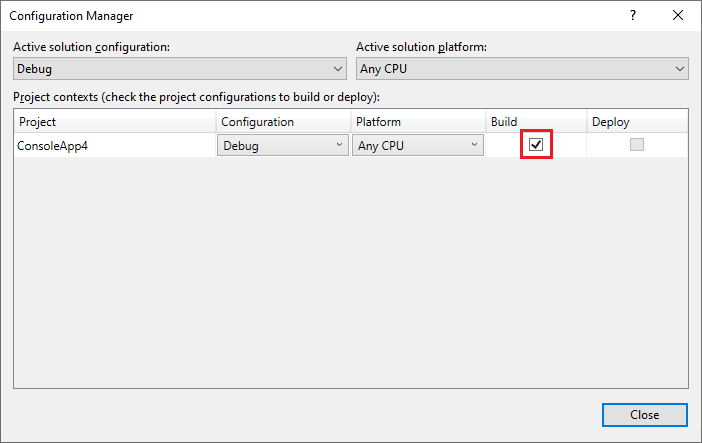
As it looked like a very specific and rare scenario, we did not add a separate setting for this behavior.
If your setup relies on the old behavior (i.e. the projects were not excluded from build by mistake), we can gladly add a setting controlling whether to show the tests from the unit test projects that are not built.
Attachments:
You must be logged in to view attached files.KeymasterAccording to our records, your trial has expired, hence VisualKernel stopped working. If you would like to get technical support, please consider purchasing a license and make sure you use an unmodified VisuaKernel installer. Please note that creating a new email address and a forum account does not automatically grant additional technical support.
KeymasterHi,
Please make sure you use an unmodified installer of VisualKernel downloaded from our website.
If it still doesn’t work, please let us know the email address associated with your license key so that we could check your support status.
September 9, 2022 at 10:57 in reply to: VisualKernel 4.0 beta – LinuxKernelDebugHelper module compile fails #33169KeymasterHi,
No problem, we can help you. The build errors happen because the LiveMemoryEngine.c file (responsible for the new Live Watch feature) cannot find the definitions of kthread_should_stop(), kthread_run() and kthread_stop() functions. The functions are defined in the kthread.h file that should normally be included from one of the headers already referenced from Live MemoryEngine.c, however it may be different in the kernel version you are using.
Do you mind adding #include <linux/kthread.h> to LiveMemoryEngine.c manually and trying to debug again? If this solves the problem, we will update it on our side.
Regarding the .ko file issue, could you please clarify how is the file referenced? Is it one of the modules indexed together with the kernel release, or are you building it manually? Also if you could attach the relevant .vkrnlproj/KernelRelease.xml files, we should be able to pinpoint the issue faster.
September 8, 2022 at 14:09 in reply to: Project property page not showing c++ and linker properties #33159KeymasterYou can if you follow the steps outlined in the documentation and tutorials. If you are doing something different from the steps suggested in the documentation, you will inevitably get different results.
We have asked you to provide the steps to reproduce the issue beginning from VS launch, accompanied by the uncropped screenshots, so that we could point out what you are doing incorrectly. Instead, you have provided ambiguous steps and attached 3 instances of the same cropped screenshot that does not show sufficient context.
We will not be able to help you based on the information you provided and have to close the issue. If you require further help, please do read and follow our problem reporting guidelines. We will not be able to provide any further replies unless you provide the information we requested.
September 8, 2022 at 13:23 in reply to: Project property page not showing c++ and linker properties #33153KeymasterUnfortunately, it is hard to suggest anything specific based on the description you provided.
In order for us to provide any help with this, we need to be able to reproduce the problem on our side.
Please provide complete and detailed steps to reproduce the issue as described below:- The steps should begin with launching Visual Studio. They should include every step necessary to create the project from scratch and reproduce the issue.
- Please make sure the steps do not involve any 3rd-party code as we will not be able to review it. If the problem only happens with a specific project, please make sure you can reproduce it on a clean project created from scratch.
- The steps should include uncropped screenshots of all wizard pages, VisualGDB Project Properties pages and any other GUI involved in reproducing the problem. This is critical for us to be able to reproduce the problem on our side.
You can read more about the best way to report VisualGDB issues in our problem reporting guidelines, If you do not wish to document the repro steps and save the screenshots, please consider recording a screen video instead and sending us a link to it.
Please note that many VisualGDB issues are caused by selecting an incompatible combination of settings at some point. We are generally not able to review specific projects and find the specific settings that were set incorrectly. We recommend checking the projects into source control and keeping a track of all changed settings to avoid breaking the projects.
You can also try checking various diagnostic output from various parts of VisualGDB as described on this page. Although we won’t be able to review it for a specific project unless the we can reproduce the problem from scratch, checking it might provide some clues on what is causing the unexpected behavior.
-
This reply was modified 4 years, 1 month ago by
support.
KeymasterHi,
If the compilation is working, most likely some parts of the platform headers use C++20 features that are not yet supported by our Clang IntelliSense engine. We are planning to release a major update to the engine in the next few months, so it should take care of it.
Until then, the only way to troubleshoot such issues would be to narrow them down to a specific broken identifier, checking where it is actually defined, and trying to move the definition around to see what triggers the issue. Most likely, IntelliSense stops parsing when it encounters a very specific language construct that it cannot work around, so the entities declared after it are not recognized. If you can locate a specific construct causing it, you can try wrapping it with #ifndef __SYSPROGS_CODESENSE__ so that the IntelliSense engine will ignore it.
KeymasterIt is hard to say why it wouldn’t work without the full context, as VisualGDB should normally automatically strip the custom port from the host name. If setting the SSH port to 22 works, it should be a reasonable workaround.
If not (or if anyone else encounters a similar issue), please feel free to share the repro steps per our problem reporting guidelines and we will investigate this further.
KeymasterIt is hard to say why it would not be working. Please try opening the CustomCMakeTargetDemo.sln solution from the tutorial directly. If it doesn’t work, please let us know and we will recheck. If it works, please try comparing your .vgdbcmake file against the one that works. If you find multiple different settings, you can try copying half of them at a time into the broken project and reloading it to see if it fixes the issue.
If you can pinpoint a specific setting that is breaking the template functionality, feel free to let us know and we will help you get it working.
KeymasterAccording to our records, your support is still not active. If you believe this is a mistake, please contact our technical support with your license details.
September 7, 2022 at 16:02 in reply to: Project property page not showing c++ and linker properties #33142KeymasterUnfortunately, it is hard to suggest anything specific based on the description you provided.
In order for us to provide any help with this, we need to be able to reproduce the problem on our side.
Please provide complete and detailed steps to reproduce the issue as described below:- The steps should begin with launching Visual Studio. They should include every step necessary to create the project from scratch and reproduce the issue.
- Please make sure the steps do not involve any 3rd-party code as we will not be able to review it. If the problem only happens with a specific project, please make sure you can reproduce it on a clean project created from scratch.
- The steps should include uncropped screenshots of all wizard pages, VisualGDB Project Properties pages and any other GUI involved in reproducing the problem. This is critical for us to be able to reproduce the problem on our side.
You can read more about the best way to report VisualGDB issues in our problem reporting guidelines, If you do not wish to document the repro steps and save the screenshots, please consider recording a screen video instead and sending us a link to it.
Please note that many VisualGDB issues are caused by selecting an incompatible combination of settings at some point. We are generally not able to review specific projects and find the specific settings that were set incorrectly. We recommend checking the projects into source control and keeping a track of all changed settings to avoid breaking the projects.
You can also try checking various diagnostic output from various parts of VisualGDB as described on this page. Although we won’t be able to review it for a specific project unless the we can reproduce the problem from scratch, checking it might provide some clues on what is causing the unexpected behavior.
KeymasterThe target is the machine where you would like to physically run gdb and is usually to the build machine to avoid confusion (there is a checkbox on the Project Settings page to override it). In this case, it should be the local machine. In order to manually connect to QEMU, please try entering “target remote <host>:<port>” into the target selection command field.
KeymasterHi,
According to our records, you do not have an active support period, hence we will not be able to help you. If anyone else wishes to help, they are welcome to post in this thread.
-
AuthorPosts