Sysprogs forums › Forums › VisualGDB › Renesas-BSP V6.4.0
- This topic has 12 replies, 2 voices, and was last updated 2 weeks, 6 days ago by
support.
-
AuthorPosts
-
March 17, 2026 at 01:38 #37165
tim
ParticipantHi,
the Renesas-BSP seems to be a bit outdated.
I need Controller-Support for Targets “R7FA0E3″and “R7FA4L1”.The Renesas BSP packages differ significantly from VGDB-BSP.
in “com.sysprogs.arm.renesas” is a DeviceDefinitions-Folder with one <devicename.xml> each.
Renesas offers Zip-Packages with Device informations, linker script etc.
e.g.
“Renesas.RA_board_ra0e3_fpb.6.4.0.pack”
“Renesas.RA_mcu_ra4l1.6.4.0.pack”Is there a easy way to import these packages to VGDB?
Is there a possibility to import the packages mentioned above by hand?
Is there a timeline from sysprog to update renesas to version 6.4.0?Kind regard
Thomas-
This topic was modified 7 months ago by
tim.
March 17, 2026 at 08:21 #37167support
KeymasterIt looks like your technical support period has expired. We would be happy to help you, however we would kindly ask you to renew your technical support on the following page first: https://sysprogs.com/splm/mykey
March 26, 2026 at 00:41 #37191ParticipantOK understand…
We renew the Licence today and Sysprog provide the “Renesas “R7FA0E3″and “R7FA4L1” Target.
Deal? 🙂Sincerly
Thomas Timme-
This reply was modified 6 months, 3 weeks ago by
March 29, 2026 at 19:03 #37195KeymasterHi,
Sure, feel free to renew, and we will rebuild the Renesas BSP based on the latest packs.
April 27, 2026 at 06:02 #37206ParticipantHi, sorry for my late reply…
We have updated our LicenceAs stated above: the RA4L1-Package is important to us.
Kind regards
ThomasMay 5, 2026 at 11:23 #37230KeymasterThanks for renewing your license.
We have looked into the new Renesas BSP and there is a major change in it. Renesas switched from shipping pre-generated linker scripts and header files to generating them during project initialization.
We are currently looking into creating a workflow similar to the Advanced STM32CubeMX Projects, that will use the VisualGDB’s project framework on top of the Renesas low-level tools for managing the project configuration.
We will post an update here once we have a preview. As a temporary workaround, you can try creating a project with the Renesas VS Code Extension, and importing it into VisualGDB. The new advanced project workflow will use a similar approach with some additional usability layer on top of it.
May 6, 2026 at 23:20 #37231Participantas I statetd above “The Renesas BSP packages differ significantly from VGDB-BSP.” 🙂
OK, thanks for the Update.
I will try your suggested workaround with VS Code.Sincerly
ThomasMay 15, 2026 at 16:22 #37247KeymasterOK, we got it working: VisualGDB-6.2.0.5606.msi
You can now create projects using the Renesas Smart Configurators by selecting “Smart Configurators” in the Embedded Project Wizard:
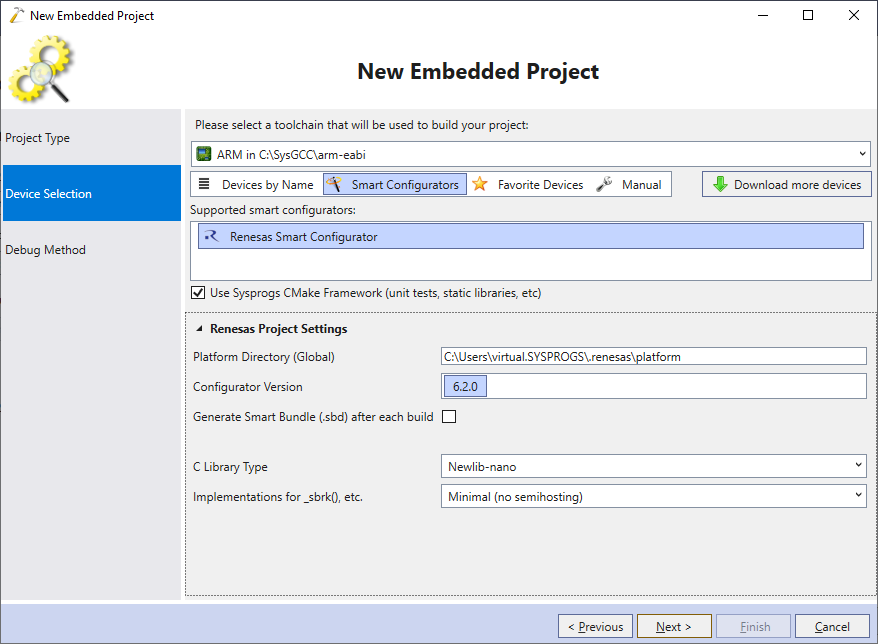
You can use 2 layouts:
- Without Sysprogs Embedded Framework, it will fully match the VS Code layout (device settings + project settings all defined together). The project will be 100% interoperable with VS Code.
- With Sysprogs Embedded Framework, the main CMakeLists.txt will look much smaller, and will support multiple executables (e.g. main + unit test + static libraries). But, using it without VisualGDB would require manually deploying our embedded framework.
You can also switch a project from the compatible layout to the Sysprogs Embedded Framework via context menu:
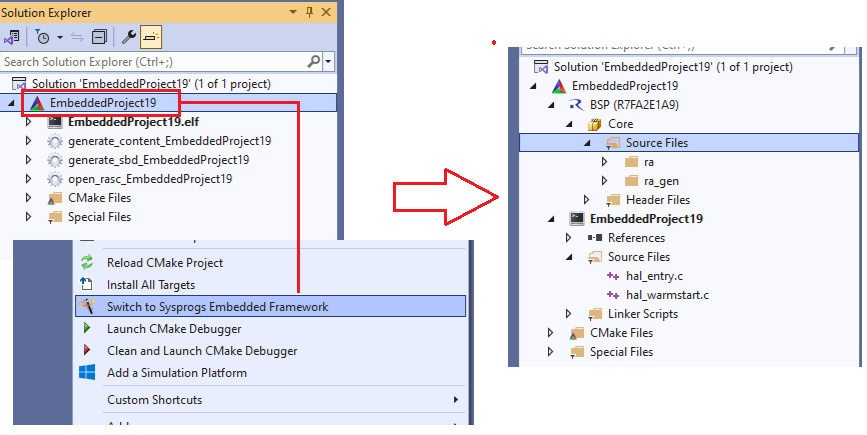
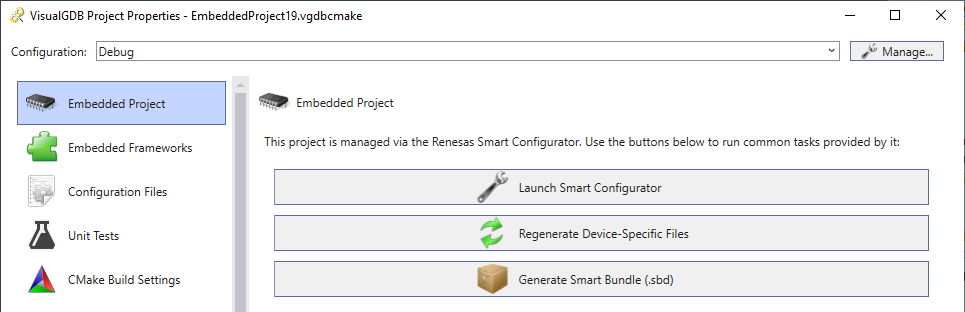
For both options, you can launch the Renesas configurator via VisualGDB Project Properties.
Attachments:
You must be logged in to view attached files.May 27, 2026 at 06:33 #37261Participantthanks a lot.
will test it (and report)kind regards
ThomasJune 26, 2026 at 03:21 #37296ParticipantHi,
I have create a Project and want to import it in VGDB.
But, there is no Menu-Entry “Smart Configurators/Renesas”.
How can I fix it?
Should I uninstall the “old” Renesas-BSP?Kind Regards
ThomasAttachments:
You must be logged in to view attached files.June 27, 2026 at 10:54 #37299KeymasterHi,
Are you using Advanced CMake? The smart configurators are CMake-based, so they require the CMake build subsystem.
August 3, 2026 at 07:02 #37337ParticipantHi,
now the the Config and Import from “Renesas RA Smart Configurator 6.5.0” runs fine.
Instead we have found a strange behavior in “Debug/Live Watch”There is a Visual Studio/VDGB-Crash in case you doubleclick the input field variables/expressions.
It is also not possible to make an input.
With “Global” the Testvariable runs fine.see attached files:
Attachments:
You must be logged in to view attached files.September 23, 2026 at 19:44 #37436KeymasterThanks for pointing this out, we have fixed it in this build: VisualGDB-6.2.0.5627.msi
We also just got Renesas support (including Live Variables and graphs) ported to CodeVROOM, so it now works outside Visual Studio as well (also, natively on Linux). Here’s an brand new tutorial: https://sysprogs.com/CodeVROOM/tutorials/renesas-ra/. Live Watch and plotting got a few upgrades compared to the Visual Studio-based GUI (e.g. live variables and graphs work with debug variable tooltips).
FWIW, CodeVROOM for Windows is included in the VisualGDB license, and uses the same project format, so you can use them interchangeably.
-
This topic was modified 7 months ago by
-
AuthorPosts
- You must be logged in to reply to this topic.