
Forum Replies Created
-
AuthorPosts
-
support
KeymasterHi,
The “Info : debug cause: 0x8” and other similar messages come from OpenOCD – the command line tool used for debugging; it is not directly related to the UART port output.
In order to see the UART output from esp8266, you would need to physically connect a USB-to-UART adapter to the UART pins on your module (please ensure you use a level translator, as UART and regular CMOS logic use different voltages and connecting them directly might burn one side). Once you connect it, you can see the UART output in the corresponding COM port (either via VisualGDB’s Embedded Terminal or using our free SmarTTY tool).
KeymasterHi,
OK, we have added a partial workaround to this. Please try this build: http://sysprogs.com/files/tmp/VisualGDB-5.3.18.2009.msi
You can disable template contents indentation via Tools->Options->Text Editor->C/C++ (VisualGDB)->Formatting->Don’t indent template contents.
VisualGDB will still add indentations when you press ‘enter’ after starting a template declaration, however they will be removed once you enter the final ‘;’ or reformat the entire document via Ctrl-K, Ctrl-D.
January 19, 2018 at 04:53 in reply to: Problem switching from [Eclipse/GNU MCU] to [Visual/VisualGDB] #13514KeymasterHi,
Thanks for the detailed description. This might be related to an OpenOCD bug in the STM32L4 driver that refuses to program some sections if they are insufficiently aligned (we were not able to reliably pinpoint it though). The file built with Eclipse shows the size of .isr_vector section to be 0x2f8, while the VisualGDB version has 0x2f4 (due to different size of mcu_cpu_systick_Handler). Please try increasing alignment of your sections and see if this works around the programming errors.
KeymasterHi,
Thanks, this looks like a bug fixed a few maintenance builds ago. Please update to the latest VisualGDB 5.3R8.
KeymasterHi,
No problem. Please let us know what are you trying to create a – stand-alone command-line Android tool, a native Android app or a Java App with C++ part built by CMake.
KeymasterHi,
Thanks for the screenshot. This type of output is processed directly by Visual Studio and should not be affected by any VisualGDB bugs. If you observe the same in Android Studio, this is likely a bug in Gradle.
KeymasterHi,
This is by design – VisualGDB normally keeps automatic rename smart tags for 3 last edits. You can disable this by setting this limit to 0 as shown below:
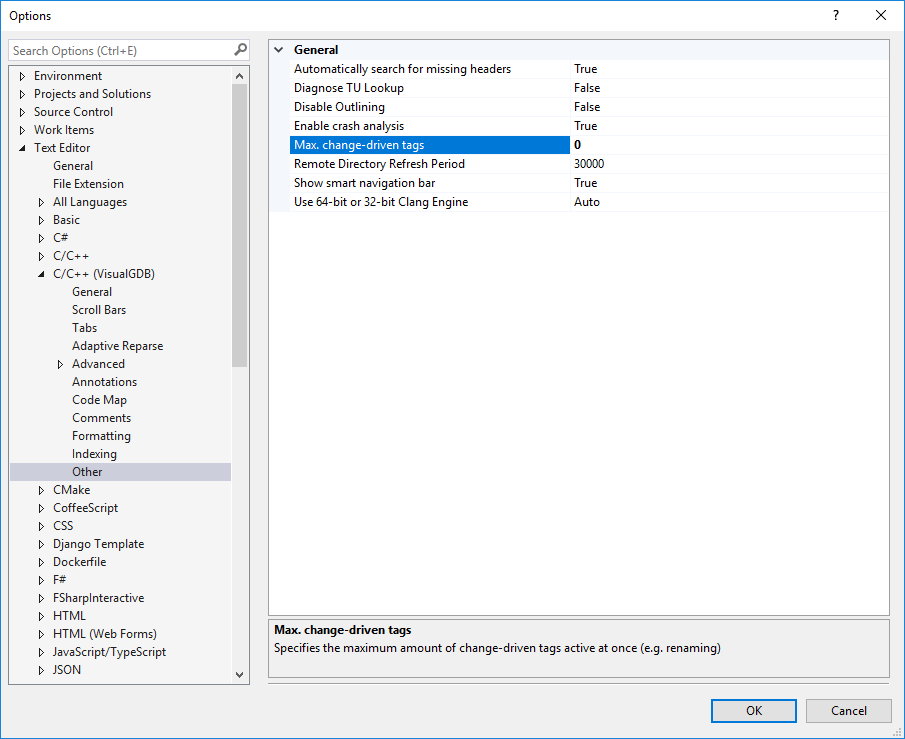
Please note that you would need to reopen your project after changing this setting.
Attachments:
You must be logged in to view attached files.KeymasterHi,
Normally the Clang IntelliSense should automatically pick this flag from the project settings. If not, please try adding it to VisualGDB Project Properties -> IntelliSense Settings -> Additional flags for C++ files.
January 19, 2018 at 04:10 in reply to: nRF52 – steps for logging via RTT to free up UART pins #13507KeymasterHi,
As we are not a vendor for Segger RTT, unfortunately we cannot provide much help for this. For VisualGDB projects we recommend using our advanced semihosting framework (enabled via the Embedded Frameworks page of VisualGDB Project Properties). It provides fast non-stop semihosting (including support for multiple colors via the ANSI escape sequences), is fully integrated with VisualGDB and doesn’t need any extra setup.
KeymasterHi,
Thanks, this might be related to a recently fixed bug. Please try this build: http://sysprogs.com/files/tmp/VisualGDB-5.3.18.2008.msi
KeymasterHi,
That would normally count as a valid attempt to rename the function. If this is annoying, we could easily add an option to disable this behavior.
KeymasterHi,
The shortcut actually comes from Visual Studio. You can see under in Edit->IntelliSense together with a other IntelliSense commands. If you are not familiar with Visual Studio commands and shortcuts, we would advise looking through the Edit menu – it contains a few very powerful commands.
KeymasterHi,
Sorry, unfortunately that is not directly supported. However as for CMake projects the Solution Explorer contents is dynamically built from the CMake project structure, you can simply copy-paste the CMakeLists.txt file structure to a newly created project (and also copy all relevant sources) and VisualGDB will automatically update Solution Explorer to show the contents of your project.
KeymasterHi,
Strange, normally this would not happen. Does this happen in the Output window (the regular Build Output pane?)? Could you please share a screenshot so that we could see if anything else could provide a hint to the cause behind this?
KeymasterHi,
You can achieve this by adding “-j<# of cores>” to the Make Command -> Customize -> Arguments. You can also use the $(LocalMultiThreadedBuildFlags) expression instead of “-j<#number>” to let VisualGDB automatically query the number of cores from your system properties.
-
AuthorPosts