Sysprogs forums › Forums › VisualGDB › Bug reports with cmake projects
- This topic has 1 reply, 2 voices, and was last updated 5 months, 1 week ago by
support.
-
AuthorPosts
-
March 20, 2026 at 20:16 #37176
wtywtykk
ParticipantHi,
I found a few problems in cmake projects, could you kindly help check them?
- There are mixed use of $ENV{TOOLCHAIN_ROOT} and ${TOOLCHAIN_ROOT} in the auto generated “toolchain.cmake” this is normally fine but since sometimes I want to run cmake in our CI system, it’s not clean to specify the variable 2 times.
- In the toolchain.cmake, VISUALGDB_BUILD_SYSTEM_ROOT is used to load “root.cmake”. But in the cmake’s “try_compile” step, the variable is not automatically passed into. So the variable will be absent in the try_compile and the following include statement can fail. The reason that it’s working now is when it’s not defined, the default path to “Program Files (x86)” is loaded and visualgdb is just there. If visualgdb is not in that default location, try_compile will fail. I suggest putting the vgdb specific functions and includes in a “if (NOT CMAKE_TRY_COMPILE)” block since try_compile actually doesn’t need bsp.
- There are a case mismatch in NRF BSP (Nordic NRF52x Devices 17.0 com.sysprogs.arm.nordic.nrf5x). When using the NRF projects with softdevice “programmed separately” the compilation will fail because the include path is missing. For example if I select “S112 (programmed separately)” the configuration to find_bsp is
CONFIGURATION com.sysprogs.bspoptions.nrf5x.softdevice=S112_reserve
But in bsp.cmake line 386, it’s checking with the lower case (S->s):if("${BSP_CONFIGURATION_com.sysprogs.bspoptions.nrf5x.softdevice}" STREQUAL "s112_reserve")But setting the configuration to lower case doesn’t work neither, because in line 389, it’s adding definition “s112” with lower case. While the BSP is checking the upper case. For example nrf_sdh_ble.c line 139:
#if !defined (S122)
4. Right click the project, Add->Add a Debug-only target doesn’t work. Saying:
VisualGDB version: 6.1.103.5547
------------------ System.ArgumentException ------------------
System.ArgumentException: Filter string you provided is not valid. The filter string must contain a description of the filter, followed by the vertical bar (|) and the filter pattern. The strings for different filtering options must also be separated by the vertical bar. Example: "Text files (*.txt)|*.txt|All files (*.*)|*.*"
at System.Windows.Forms.FileDialog.set_Filter(String value)
at u04.c1()
at h84.a.a_2_2_2_2_2_2_2_2_2_2_2_2_2_2_2_2_2_2_2_2_2_2_2_2_2_2_2_2_2_2_2_2_2_2_2_2_2_2_2_2_2_2_2_2_2_2_2_2_2(ap1 b, Object a)
at r1.h1.Exec(Guid& b, UInt32 c, UInt32 d, IntPtr e, IntPtr a)
trace=[System.Windows.Forms.FileDialog.set_Filter:69, u04.c1:126, h84+a.a_2_2_2_2_2_2_2_2_2_2_2_2_2_2_2_2_2_2_2_2_2_2_2_2_2_2_2_2_2_2_2_2_2_2_2_2_2_2_2_2_2_2_2_2_2_2_2_2_2:336, r1+h1.Exec:423]
5. Unable to move BSP to project directory: In the project property dialog, I see a button with “Change…” on the left of “Regenerate MCU files”. I selected “Select a specific BSP copy explicitly” and types the directory name. After clicking OK, I saw the files copied to project directory, but the CMakeLists.txt is not modified.
To be clear, the problems above is not blocking me and I’ve found the workaround for some of them. But it will be great if you can help fix them.
VS: VS2026 Community 18.4.1
VGDB: 6.1R3 build 5547
Many thanks,
Tianyi
-
This topic was modified 6 months, 3 weeks ago by
wtywtykk.
May 3, 2026 at 19:52 #37220support
KeymasterHi,
No problem, please find a detailed reply below.
The mixed ${TOOLCHAIN_ROOT} vs $ENV{TOOLCHAIN_ROOT} are mostly due to historical reasons. Our BSP engine started out with just GNU Make, then got ported to then-limited CMake, and eventually evolved into the current Advanced CMake Project Subsystem. At each step we tried to maintain maximum compatibility with the previous versions, that led to some redundancies.
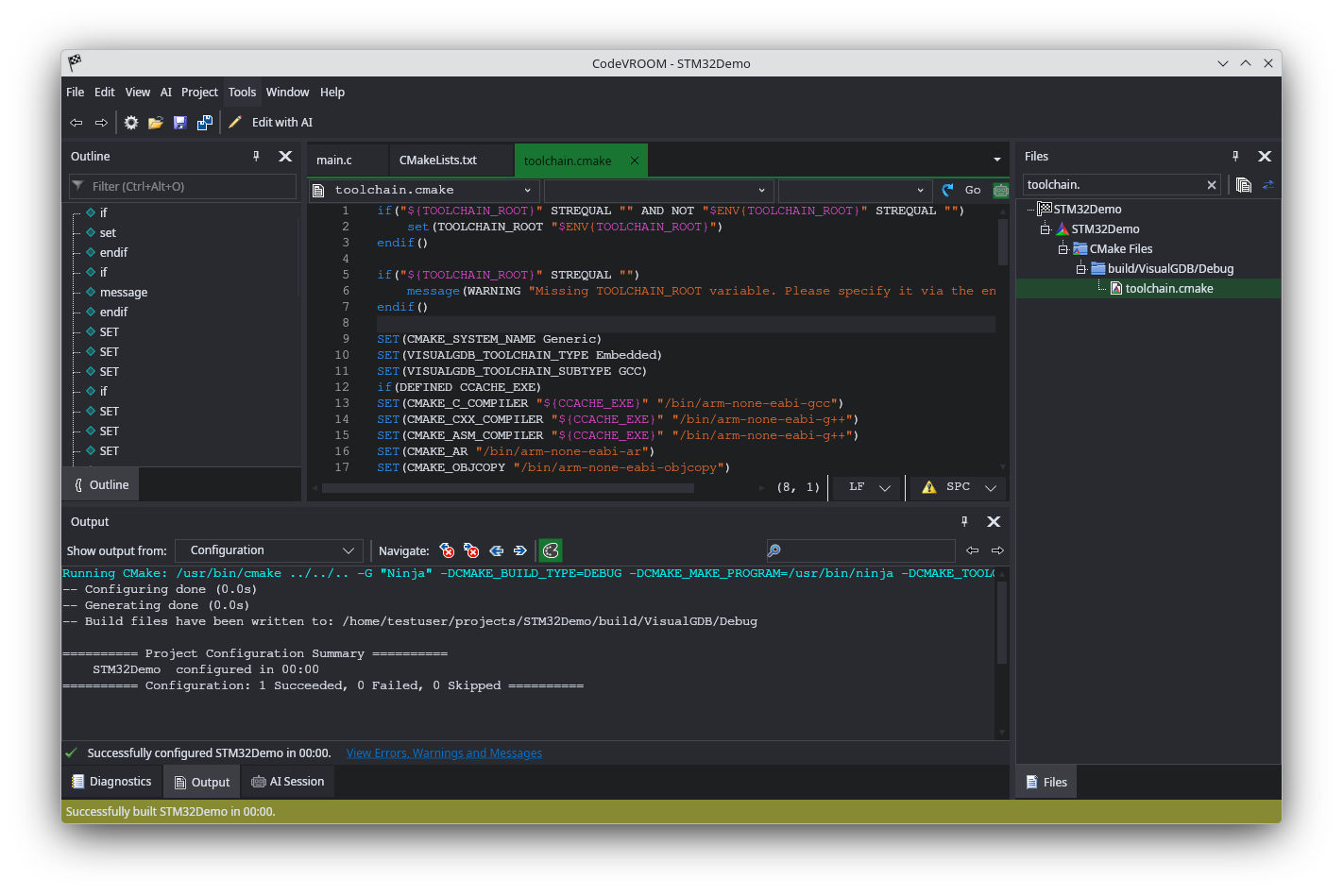
That said, we’ve been working a while on a streamlined cross-platform subset of our CMake subsystem (and the Clang-based code navigation), and we just got released the first version. It now expects TOOLCHAIN_ROOT to come from the environment, and sets the regular ${TOOLCHAIN_ROOT} in the generated toolchain.cmake file (see the screenshot). It also now runs natively on Windows, Linux and Mac, including the code navigation. The same update is coming to VisualGDB 6.2.
${VISUALGDB_BUILD_SYSTEM_ROOT} now also comes from ${ENV}.
The S122 case is a bug in the BSP definition. You can fix it by editing the BSP.XML file, particularly the ConditionalToolFlags elements. Make sure you delete the bsp.cmake file afterwards though, so it will be rebuilt. As Nordic has mostly moved on to the new nRFConnect framework, we do not have any plans for updating the regular SDK, but if anyone else finds this annoying, we can release a hotfix.
We fixed the debug target bug in this build: VisualGDB-6.1.103.5591.msi
We will be porting the BSP-moving GUI to CodeVROOM very soon, and will look into the bug you mentioned.
Attachments:
You must be logged in to view attached files. -
AuthorPosts
- You must be logged in to reply to this topic.