
Forum Replies Created
-
AuthorPosts
-
Sherlock
ParticipantOK I was wrong, there’s a small misleading thing in the UI where it says
Program FLASH memory: Always Never If rebuilt since last load
(That probably should say: Publish to memory:… and not be hard coded as FLASH).
I’d set that to “Never” but that was an error, if I create the project to target SRAM then I should leave the above option set (i.e do not set it to “Never”).
I did this and it publishes it to SRAM, I debugged he code and looked at the assembly and it is indeed in RAM and not FLASH.
I’m going to compare two projects and see what differs between an initial choice of FLASH and SRAM then I might be able to make these distinct configurations…
-
This reply was modified 1 year, 6 months ago by
Sherlock.
ParticipantIt’s confusing, I’d assumed that if I created a new simple blinker project but specified SRAM rather than FLASH when creating the project, then it would just work and publish the code to RAM and be debuggable etc.
But that’s not true, it’s looking like one cannot do this without some additional manual steps or editing and I can’t find any documentation about this.
ParticipantI see, OK that’s an idea for me to ponder.
I’m wondering if I can somehow define a VS build configuration for this, like we have “Debug” and “Release” already defined, we can add more and I’ve done this on large C# applications but not with VisualGDB.
I’d have
Debug – FLASH, Debug – SRAM, Release – FLASH, Release – SRAM for example.
-
This reply was modified 1 year, 6 months ago by
ParticipantHi, OK thanks, I did used to do a great deal of Win32 C development on Windows but that stopped around nine years ago so I am rusty.
Anyway I did get what seeking to do, two projects each referring to to “libraries” – these are in an unrelated sub folder and the projects are referring to these source by relative paths and also have additional include paths specified at the MS project level, so that they can see the header for these libraries.
The code is all being developed on Nucleo F446RE boards.
You can see how I did this:
(The receiver is at this point, more or less a clone of the transmitter, I’ve not really started working on that yet).
This seems to be sufficient for what I wanted being able to share library code easily, but if you have any suggestions or ways to do this better, please do shout!
Thanks
ParticipantOK I see, so that’s not something I can do.
Well my core question is then, how can I have two distinct projects, in different folders, be able to “see” source and headers in some other folder?
Is there any way to adjust a project’s setting to tell it to include some source folder and some header folder, when compiling?
I can see that the Visual Studio project settings offer an “Additional Include Directories”, is that the only way to do this? and can that also contain .c files, not only .h?
I want to work on two distinct projects where each one must include some support headers and source files, I do not want to duplicate these as copies within each project’s folder so how can I do this?
Thanks.
ParticipantI should have mentioned that, the problem is that when I do that the only buttons I see on the dialog is “Add” and “Cancel” I do not see the small arrow that usually appears. If I I try the same thing on some other non Visual GDB project I do see the small arrow. The dialog should show a button that looks like this:
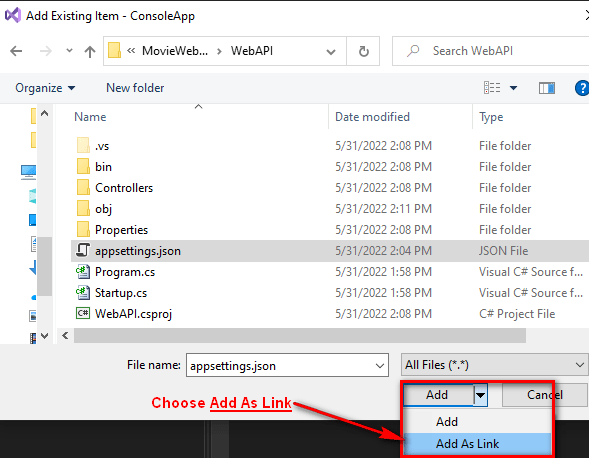
But I see no arrow, just a plain “Add” button.
ParticipantYes, you’re right! “refactoring suggestion” my apologies, many thanks!
ParticipantJust FYI too, I’m using VS 2022 version 17.3.6 and have the Color Theme set to Dark+ which is what I use for .Net and other projects and languages.

This might help you reproduce it.
ParticipantHi, OK I looked at that (and I’ve used this a lot in the past for my C# .Net work) but I do not know which specific C++ entry to adjust.
If I simply begin to edit an existing name, this odd highlighting kicks in, so it is the act of editing an existing name that seems to trigger this, and I have no idea what specific C++ entry this pertains to!
If I edit a C# file in a C# project it doesn’t do this, it does kind of select the name being edited but highlights it differently, the name gets surrounded in a dotted rectangle but the word is readable, slightly shaded but readable.
Thanks
-
This reply was modified 3 years, 12 months ago by
ParticipantHi, thanks this is helpful, for my immediate purposes I’m using MSBuild projects and nothing more.
I created a new repo and used the Github Visual Studio ignore, then added this:
# VisualGDB MSBuild Projects
.vs/
.visualgdb/
VisualGDB/Does this seem OK? might there be anything additional to consider?
Thanks
ParticipantBeautiful !
All good, thanks for a prompt and precise response, much appreciated.
ParticipantOK installing now…
ParticipantInterestingly that when I choose “Program and Start Without Debugging” this succeeds, I see the “The device has been programmed successfully” dialog and the board seems to reset and the code gets loaded (I can see expected activity on my DSO).
ParticipantI can’t see the “Edit” option here any more so I can’t add to my original post.
Anyway I just ran a repair of Visual GDB but this seems to have had no effect on this behavior.
-
This reply was modified 1 year, 6 months ago by
-
AuthorPosts