
Forum Replies Created
-
AuthorPosts
-
support
KeymasterThanks for letting us know. Looks like some solution-related events come in the order not expected by VisualGDB. Please let us know if you open the project via file File menu in Visual Studio, or by clicking on the .sln file in Explorer. Please also let us know whether there are other projects in the same solution and what is the type of the project (Embedded, Linux, Arduino, etc.).
KeymasterHi,
We are prioritizing GUI redesign of different parts of VisualGDB based on the redesign complexity, usability impact of the existing WinForms rendering for a specific part of the GUI and the number of affected users. As for now, we are prioritizing other functionality over conversion of this page.
KeymasterHi,
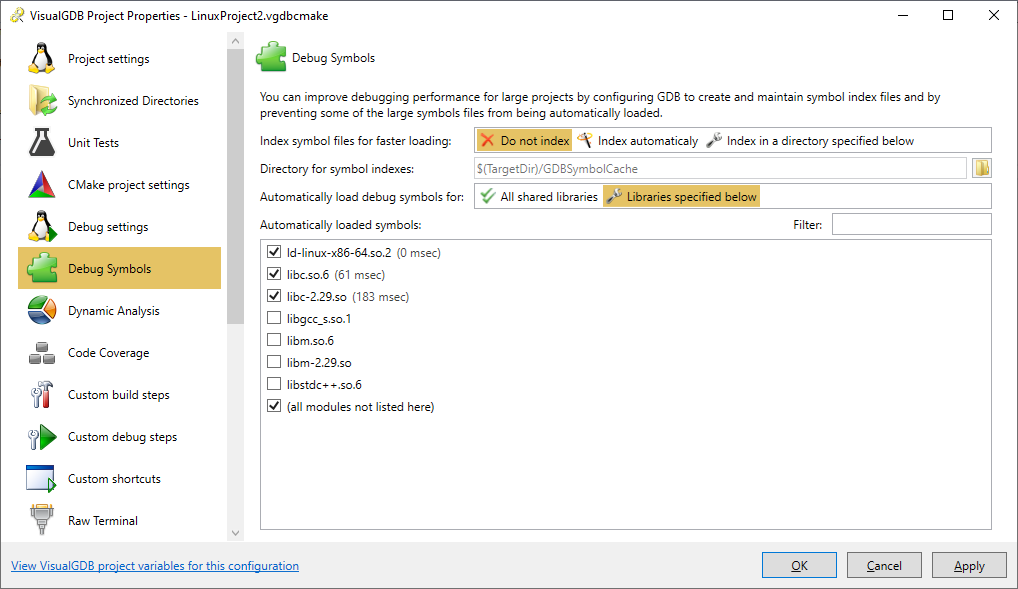
Just wanted to let you know that we have added full support for specifying which symbols get loaded automatically for Linux projects in the following build: VisualGDB-5.5.1.3322.msi
You can configure it via the Debug Symbols page of VisualGDB Project Properties:
Attachments:
You must be logged in to view attached files.KeymasterSorry, most likely you have changed some settings or installed a new version of a toolchain/BSP that was not compatible with the existing projects.
Although we do our best to keep VisualGDB releases backward-compatible, it is not possible for us to guarantee the same behavior for every external toolchain, SDK or library that could be possibly used with VisualGDB, sorry.
KeymasterSorry, it looks like your support period has expired. Please consider renewing it here in order to continue receiving technical support.
KeymasterSorry, it looks like your support period has expired. Please consider renewing it here and we will help you get everything to work.
October 19, 2019 at 15:36 in reply to: ESP-IDF, arduino as component : Where to place third party librairies ? #26238KeymasterNo problem, we have added it to the backlog and will consider making a tutorial on this in the future.
KeymasterThanks for pointing this out, please try the following build instead: VisualGDB-5.5.1.3317.msi
KeymasterHi,
No problem. Indeed, when using Segger J-Link, VisualGDB would try to parse the esptool command line, reconstruct the FLASH memory layout from it and then load it using the OpenOCD’s commands. This mechanism is relatively fragile, so it might indeed not work in some cases.
In order to track this down, please try the following build: VisualGDB-5.5.1.3314.msi
Then open View->Other Windows->VisualGDB Diagnostics Console and try programming the memory using J-Link.
Once the memory is programmed, please locate the following lines in the diagnostic log:
- Parsing esptool command should show the command line of the esptool used by the Arduino build system.
- com.sysprogs.esp32.esptool.binaries.count and subsequent lines should show the FLASH structure reconstructed from the command line. Please check it for any obvious inconsistencies compared to the command line.
- ExecuteRawCommand(mon program_esp32, <…>, CLI) lines will show the actual FLASH programming commands issued by VisualGDB to OpenOCD. They should match the FLASH memory layout in the esptool command line.
If you can point out a specific part of the esptool command line that gets parsed incorrectly, it should be very easy for us to fix it. However, if it’s not that obvious, we would need you to collect more information:
- Erase the FLASH memory using esptool.py.
- Program the memory using the “Arduino tools”.
- Read back the FLASH memory using esptool.py.
- Erase the entire memory again
- Program it using J-Link.
- Read it back via esptool.py
- Compare the results (e.g. using fc.exe /b).
- Finally, post the entire diagnostic log from VisualGDB and the results of the comparison to this thread, or send it via our support form so that we could double-check everything on our side.
P.S. It would also be great if you could either update your forum profile to match the email used in the license key, or send it via our support form so that we could internally link it to your forum profile.
KeymasterHi,
No problem. Although fixing the Espressif’s GDB executable is outside of what we can offer as a part of VisualGDB, we have updated our Arduino project subsystem to allow editing common build parametersvia the regular VS Properties so that you could try the workaround described in the Github issue. Please try this build: VisualGDB-5.5.1.3313.msi
Then open VS Project Properties for the Arduino project, go to C/C++ -> Optimization and set Inline Functions to No. This should affect both the main sketch and the libraries, working around the problem.
KeymasterHi,
You can open the Threads view using the Debug->Windows->Threads command in Visual Studio
The VisualGDBExtensibility.dll library is shipped with VisualGDB (normally C:\Program Files (x86)\Sysprogs\VisualGDB\VisualGDBExtensibility.dll). Simply add it as a reference to the project referencing it and you should be able to build it.
KeymasterHi,
Indeed, the VisualGDB’s startup file looks different from the original one. Our BSP generation logic parses the interrupt vector list from the original file and generates a compatible startup file that has the same interrupt vector definitions, but is also compatible with VisualGDB-specific parameters (e.g. FLASH/RAM memory layout).
The linker script is also regenerated based on the memory map. This enables GUI-driven features like “fixed-size stack/heap”, however would indeed break 3rd-party tools that expect specific sections in the ELF image. Using the original ELF file instead should fully solve the problem.
The stack error is shown because the original linker script places the __StackLimit symbol at the beginning of RAM, while most SDKs from other vendors place it to the end of RAM:
  __StackTop = ORIGIN(RAM) + SIZEOF(.stack_dummy);
  __StackLimit = ORIGIN(RAM);
The easiest way to work around this would be to locate the EndOfStackSymbol element in the .vgdbsettings file and manually change its contents to __StackTop to match the name used in the EFM32 linker script.
KeymasterSorry, this is actually an issue caused by a recent change in the way Visual Studio reports its color settings to language services like the one used by VisualGDB.
Please try the following build, it already contains a fix for it: VisualGDB-5.5.1.3311.msi
October 18, 2019 at 22:22 in reply to: CMSIS-DAP device showing up multiple times and debug fails #26227KeymasterThanks for the update. This could be caused by another issue – one of the recent GDB updates changed the way the command-line arguments must be escaped and it looks like our OpenOCD toolchain did not specify it correctly. It may cause issues when trying to pass command-line arguments with spaces (such as -c “xxx yyy zzz”).
We have updated our OpenOCD toolchain package one again resolving the issue. Please feel free to reinstall it, or to simply add the ArgumentEscapingMode line to toolchain.xml as shown below:
<?xml version="1.0"?>
<Toolchain xmlns:xsi="http://www.w3.org/2001/XMLSchema-instance" xmlns:xsd="http://www.w3.org/2001/XMLSchema">
    <...>
    <ArgumentEscapingMode>Advanced</ArgumentEscapingMode>
</Toolchain>
Please also ensure you are using the latest VisualGDB build: VisualGDB-5.5.1.3311.msi
You can verify the arguments seen by OpenOCD by setting a breakpoint in main and evaluating “*argv@argc” in the Watch window (it will expand *argv to a fixed-size array of size argc). If the arguments still don’t match what is specified in VisualGDB Project Properties, please let us know.
If the arguments are correct, but OpenOCD still does not work, please let us know if you are able to step into openocd_main(), i.e. if the source line mapping and variable evaluation are working.
October 18, 2019 at 21:58 in reply to: ESP-IDF, arduino as component : Where to place third party librairies ? #26221KeymasterHi,
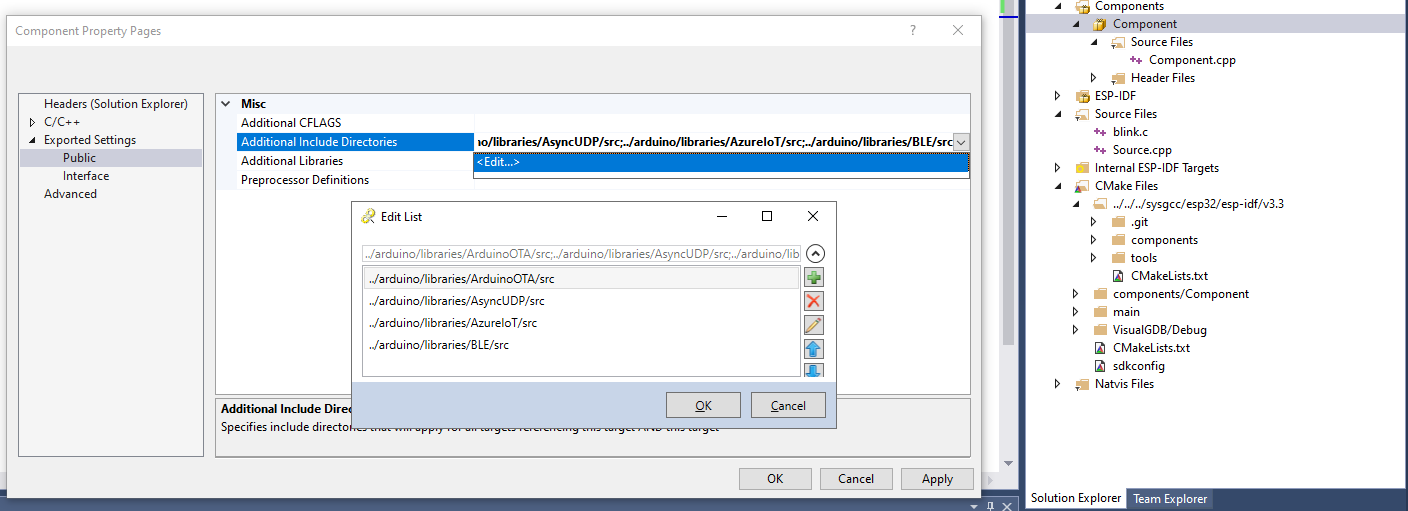
Good to know it works. As promised, below are the details on setting this option using the VisualGDB GUI.
- Select the component in Solution Explorer (or the project itself if you are editing the main component).
- Right-click on it and select “Properties”.
- Use the Exported Settings -> Public -> Additional Include Directories property to interactively edit the directory list:
Attachments:
You must be logged in to view attached files. -
AuthorPosts