
Forum Replies Created
-
AuthorPosts
-
support
KeymasterHi,
Please refer to the following post for details: https://blog.kitware.com/cmake-finding-qt5-the-right-way/
KeymasterHi,
If this is the same board you mentioned before (where you had to hold the reset button in order to connect using the ST-Link utility), please make sure you do the same with VisualGDB. Please also try using the “connect under reset” checkbox.
If nothing helps, please try checking if the board works when using the Eclipse-based STM32 IDE, that also uses OpenOCD.
KeymasterHi,
Sorry, this is not supported directly, as it’s a rather rare case. Our best advice would be to see how the regular includes are handled on the Makefile level and patch it, adding a new variable for -isystem entries.
You will also need to add those paths to IntelliSense include directories via VisualGDB Project Properties -> IntelliSense Directories.
KeymasterGood to know it works. We used to recommend using the libusb-win32 driver with ST-Link previously, but the recent official ST-Link has superseded it, since it’s also based on libusb. It’s hard to say why it didn’t work with this specific ST-Link, but if the generic libusb works, it should be as good as the official ST-Link one.
KeymasterStrange. It looks like your ST-Link might be not supported by the latest drivers from ST (or needing a firmware upgrade). Please try checking if the ST’s Eclipse-based STM32 IDE (that also uses OpenOCD) can debug the board. If not, the only other thing to try would be a different ST-Link (or a different debug probe altogether).
KeymasterThanks, it looks like the board has an older version of ST-Link that requires a manual driver installation.
Please try right-clicking on the “USB Mass Storage Device” and selecting “Update Driver -> Browse my computer -> Let me pick a driver -> Have Disk” and point the driver installation GUI to the ST-Link drivers folder near the ST-Link utility folder. After the correct driver is installed, the device should appear as “STM32 ST-Link”.
May 12, 2020 at 15:46 in reply to: VisualKernel hangs when creating new Kernel Module on Source Code Access #28113KeymasterNo problem, feel free to get back to us once you continue.
KeymasterGood to know it works. Despite redesigning the Quick Debug GUI, we haven’t changed the path mapping logic for a while, so the problem was likely caused by something else (e.g. you configured the path mappings in the older version, but them somehow reverted them).
Either way, the mappings are stored in the .quickdebug files under %LOCALAPPDATA%\VisualGDB\QuickDebugPresets. Feel free to make a backup of them and use it as a comparison point in case of further problems.
KeymasterThanks for sharing the detailed screenshots. Indeed, MSBuild would normally expand the MSBuild-level variables and the environment variables, but not VisualGDB-specific variables.
Please try this build: VisualGDB-5.5.5.3610.msi
Then open VisualGDB Project Properties -> User Variables and ensure that the variables you want to use from MSBuild have the “propagate to the environment” flag set. If it is already set, change any variable value and press “Apply” to force VisualGDB to rebuild the property files. This will generate a $(ProjectName)-user.props file in the project directory, that will list the variables exported to MSBuild.
VisualGDB will automatically include that file when building the project, letting you reference those variables across the MSBuild settings.
Let us know if you have any feedback about the new feature and we will be happy to make it even better.
KeymasterHi,
The path mappings for the Quick Debug presets can be edited by clicking the “edit source path mapping” button in the GDB Session window:

Please double-check that the mappings shown there match your setup.
If you are not sure, please attach a screenshot of the Edit Path Mapping window with your settings and we will help you understand what is going on.
Attachments:
You must be logged in to view attached files.KeymasterHi,
Please try checking ST-Link in the Windows Device Manager (View->Show Devices by Connection). Does it show the ST-Link Debug driver as shown below? If not, please try installing it manually (the drivers are located inside the ST-Link Tool directory).
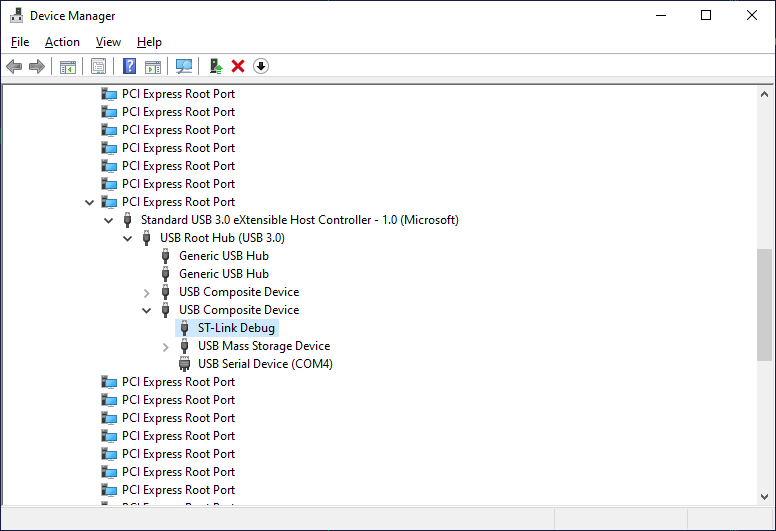
If not, or you are not sure, please attach a screenshot of the Windows Device Manager showing ST-Link in the Devices By Connection mode.
Attachments:
You must be logged in to view attached files.KeymasterHi,
This looks like an issue with the ESP-IDF itself and not something specific to VisualGDB. Please see our ESP-IDF troubleshooting instructions for help with narrowing this down.
KeymasterYes, please try VisualGDB 5.5 Preview 5: https://sysprogs.com/w/announcing-visualgdb-5-5-preview-5/
KeymasterHi,
mklink is actually a Windows command for managing symbolic links and is not specific to VisualGDB. We have included a link to the command documentation from Microsoft that would help you understand it.
Either way, you can check symbolic link functionality by opening the Windows command prompt via the Start Menu and then running the following command:
mklink /d c:\SysGCC\raspberry\test c:\SysGCC\raspberry\bin
If it fails, something on your system is interfering with the symbolic links and the toolchains may not work as expected.
Unfortunately the log you provided is a list of all warnings, but not the diagnostic log we requested (we have provided instructions on obtaining a diagnostic log in our previous reply). If the mklink command works, please attach a screenshot showing the output from it and the diagnostic log from the folder synchronization as instructed before, and we will try to help you troubleshoot this.
KeymasterHi,
Please try updating to VisualGDB 5.5 Preview 5. It includes automatic troubleshooting for missing references.
-
AuthorPosts