Forum Replies Created
-
AuthorPosts
-
support
KeymasterHi,
Good to know it works. The OpenOCD scripts for STM32 devices are normally maintained by ST, so they should just work out-of-the-box as long as you are using an OpenOCD version that matches them.
In case of any further strange errors, please consider deleting the OpenOCD directory entirely and re-installing it via VisualGDB Package Manager.
KeymasterThanks, we have noted it and will try to assign a higher priority to this, although it’s hard to give any estimates at this point.
KeymasterHi,
Due to the MSBuild design constraints, VisualGDB indeed only has access to a handful of MSBuild macros. Specifically, you can use:
- $(ProjectDir) (derived from the .vgdbsettings file location)
- $(ConfigurationName)
- $(SolutionDir)
- $(SolutionPath)
You can view the available macros via a link at the bottom of the VisualGDB Project Properties window.
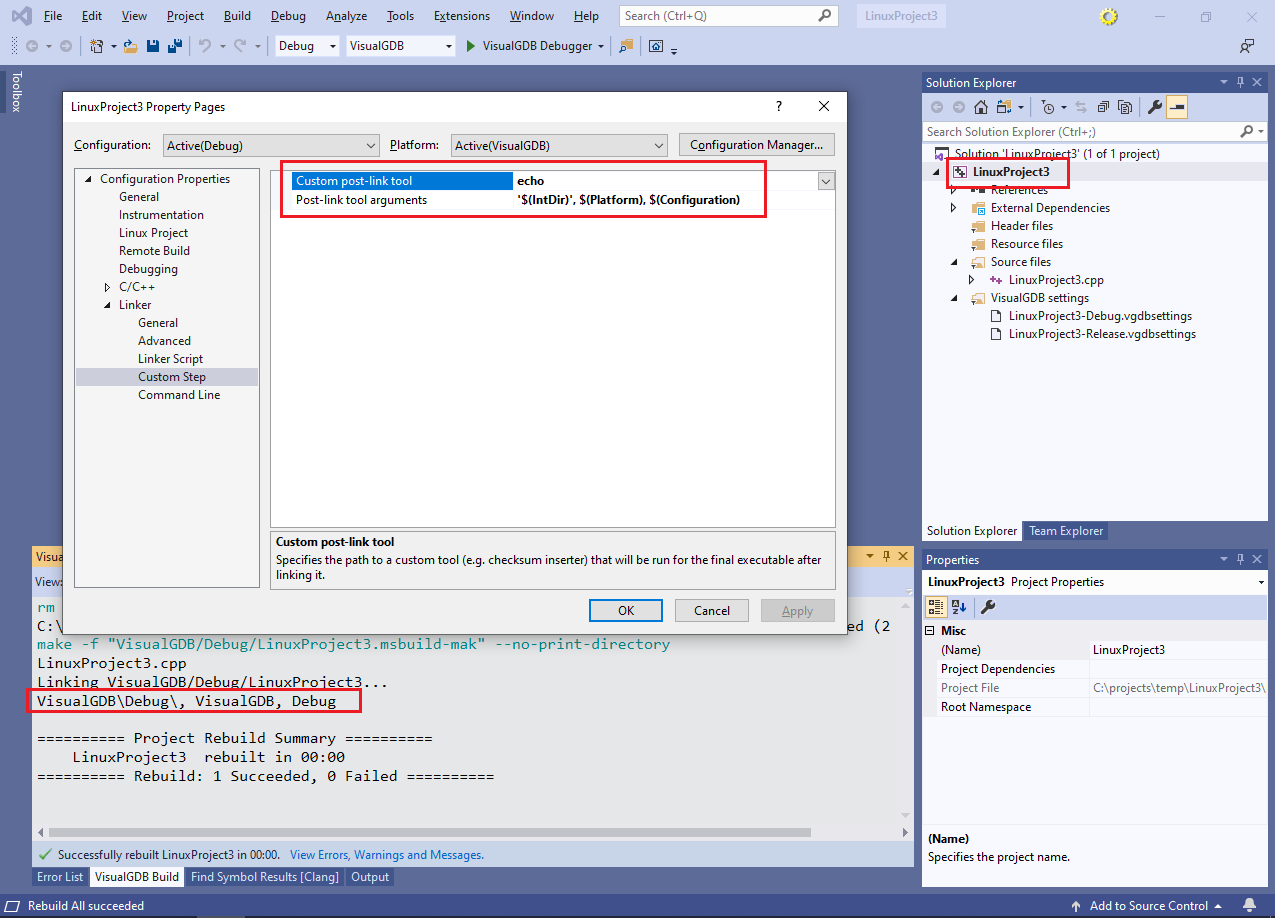
If you would like to use MSBuild macros instead, please consider using the VS Project Properties -> C/C++ (or Linker) -> Custom Step option. This works on MSBuild level and allows referencing any MSBuild variables. It is also possible to add custom MSBuild targets (that would result in additional entries in the generated Makefile), although it is more complicated to setup. Let us know if you need more details on that option.
KeymasterPlease try using the following syntax:
/projectconfig "Release|VisualGDB"
Note the quotes and no spaces.
KeymasterHi,
Based on the error message you shared, it looks like VisualGDB is not installed on the machine you are using to build the project.
Please ensure VisualGDB is installed and activated on the user account used to run the automated builds.
Please feel free to look through the following tutorial for a detailed step-by-step example: https://visualgdb.com/tutorials/ci/tfs/
If you can confirm that VisualGDB is installed, please try building the solution using devenv.exe, not msbuild.exe (see this page).
January 3, 2020 at 17:35 in reply to: Request a visualGDB tutorial to use LittlevGL and ESP32 #26969KeymasterSorry, this is way to specific to be covered directly. Please consider asking on the Littlevgl or ESP32 forum.
KeymasterSorry, this is by design. Different boards have different clock configurations, so unless you specifically clone a sample designed for your board (via the “STM32CubeMX Samples” switch in the wizard), you would need to adjust the clock settings to match your board.
If you believe the clock configuration for a board-specific sample in invalid, please consider reporting it to ST, as VisualGDB takes the STM32CubeMX samples directly from the STM32 SDKs.
KeymasterSorry, unfortunately it’s beyond the scope of our product support to help troubleshoot project-specific issues. Our best advice would be to step through the clock-related code in both projects and compare it side-by-side.
If this doesn’t help, please consider creating a topic on the STM32 forums or on StackOverflow to get help from other developers.
KeymasterNo problem. We have double-checked it and indeed the precompiled mbed binaries for Python 3 would not work on some machines.
We have updated VisualGDB internally to launch the .py script instead, that should resolve the problem. This fix will be included in the upcoming VisualGDB 5.5 Preview 3. Until then, using Python 2.7 instead of 3.x should be the best workaround.
KeymasterHi,
Most likely, some mbed tools (e.g. Python environment) are corrupt. Please try this build, it will display more information about the errors: VisualGDB-5.5.2.3426.msi
If some mbed tools fail to launch, please try deleting the entire Python environment containing them and let VisualGDB re-install it from scratch. If nothing helps, please check whether the mbed tools reported in the error details can be launched manually. If not, please check your antivirus for false positives.
KeymasterSorry, unfortunately target-specific issues like this one are not covered by the regular VisualGDB support.
If you believe an STM32 device is not operating as expected, please consider contacting ST support, or posting on ST forums.
December 31, 2019 at 00:39 in reply to: Probleme with latest ARM Toolchain and time functions #26955KeymasterThanks for pointing this out!
KeymasterGood to know it works. Most likely, you have initially upgraded the toolchain, but not the SD card image (or the other way) and synchronized an incompatible SD card image with a toolchain that expected different versions of the headers/libraries. Either way, the procedure you described is the correct way of resetting the toolchain, so it should now work as expected.
December 27, 2019 at 16:59 in reply to: Clock from CubeMX not applied in VisualGDB on stm32f446 #26951KeymasterHi,
Thanks for finding this out. Normally, the clock-related code in stm32fxxx.cfg would get executed just after starting a debug session. It would raise the system clock frequency, allowing for faster FLASH programming and faster JTAG communication, and once the SystemClock_Config() runs, it would override the parameters set via stm32fxxx.cfg.
The clock parameters set by the stm32fxxx.cfg would only affect the code that runs before SystemClock_Config() (i.e. startup code) and should not affect the rest of the program.
Either way, if you prefer disabling this mechanism, you can copy a modified version of the .cfg file to the project directory and replace the path to it in OpenOCD settings (expand the Advanced view to edit it) to $(ProjectDir.forwardslashes)/<cfg file name>.
Regarding the startup file, VisualGDB normally does not allow replacing it because the file shipped with VisualGDB is 100% equivalent to the original .s file. It only defines the interrupt vector table and the reset handler and does not handle the clock. If you absolutely need to override it, please consider setting the “excluded from build” flag for the .c file and adding the .s file to the project manually.
-
AuthorPosts