
Forum Replies Created
-
AuthorPosts
-
support
KeymasterHi,
The exact names and structure of the IRQ handlers slightly varies between different mbed versions.
In general, the thread_switch_helper callback is supposed to be called just before the mbed runtime switches the context to another thread, so the VisualGDB profiler could handle this event and update its internal structures accordingly.
If the version you are using does not have the SVC_ContextSwitch call, please try locating the logic responsible for loading the stack pointer (similar to SVC_ContextRestore on the screenshot in our profiling tutorial) and inserting the call to thread_switch_helper just before it.
Edit: we have just retested the VisualGDB profiling with the latest mbed release and updated the tutorial. As of mbed 6.16, the call to thread_switch_helper goes right after the SVC_ContextRestore label and needs to save/restore the LR register as well as shown in the updated tutorial.
KeymasterHi,
We have just rechecked the switching between the debug and release configurations and it worked just fine.
Most likely, you have changed some project settings to the values preventing VisualGDB from loading it.
Please try creating a new project from scratch and check if the problem persists. If not, please try comparing the settings between the 2 projects and eliminating the differences one-by-one.
KeymasterHi,
For CMake projects, the debugged executable path is automatically derived from the actual project structure. If you would like to debug arbitrary executables, we would advise using Quick Debug instead.
If you would like to have multiple debug configurations, you can try using the configuration/platform manager. Simply add a CMake-level variable in the configuration settings, and then check it on the CMake statement level (e.g. using the ${} syntax or in conditional statements) to produce different executables in different configurations.
VisualGDB will automatically pick up the correct executable based on the active platform.
If this is not what you are looking for, please let us know more what you are trying to accomplish, and we will try to suggest a better solution.
August 1, 2022 at 18:54 in reply to: Clang Intellisense: Cannot connect to the smart tag backend. #32921KeymasterHi,
Please refer to the following page for details: https://visualgdb.com/documentation/mefcache/
KeymasterHi,
This error means that gdb requests the device to read the memory at address 0x20050004 and the device responds with an error. The address would normally be computed by OpenOCD based on the debug settings (e.g. device script) and the ELF file produced by the mbed build.
The best way to troubleshoot it would be to recheck the device datasheet whether it’s a valid memory address (e.g. part of RAM). If it is, please double-check the OpenOCD debug scripts and settings for possible settings preventing memory reads from working. If it is not, please recheck the ELF file and the debug settings for possible hints pointing to the incorrect address.
KeymasterThanks for sharing this. It indeed looks like a change in ESP-IDF structure and not something VisualGDB would handle automatically. That said, if you do not want to edit the CMakeLists files manually, you can always specify the extra environment variables via the VisualGDB GUI as shown below:
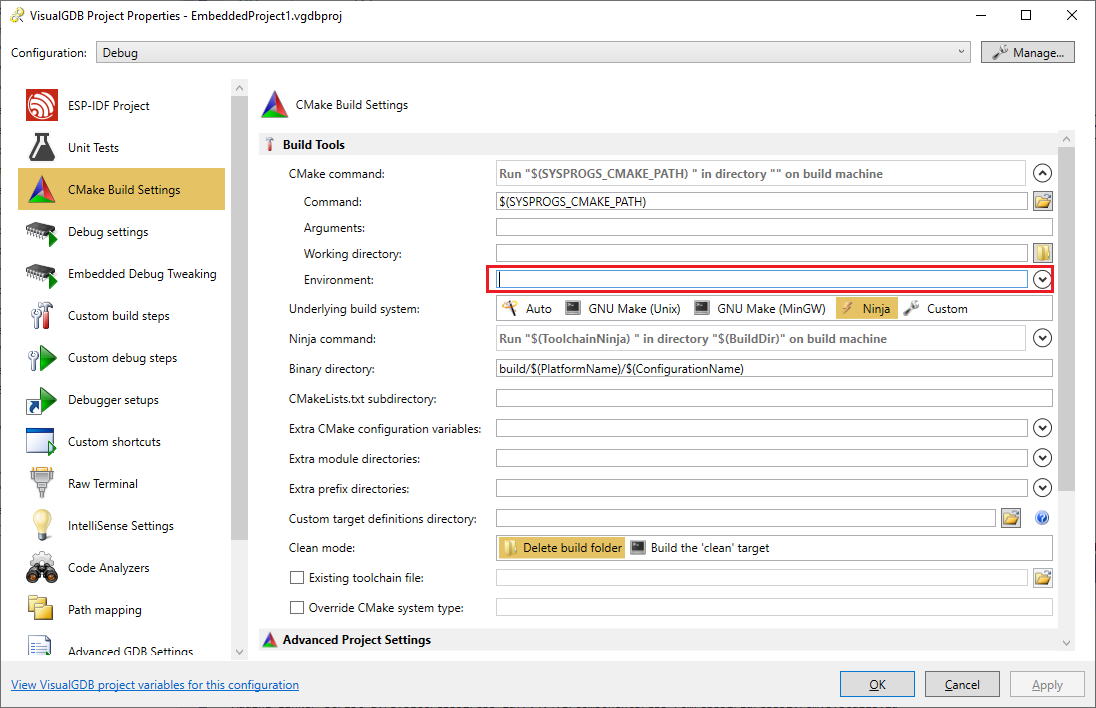
Attachments:
You must be logged in to view attached files.KeymasterNo problem, we have added a detailed documentation page explaining MEF issues: https://visualgdb.com/documentation/mefcache/.
If it doesn’t help, please share your observations (the logs mentioned on the page) and we will help you get it working.
KeymasterHi,
Sorry, it looks like something specific to your project or the gcc compiler rather than a VisualGDB-specific issue. If you would like to get generic programming help, please consider creating a question on StackOverflow instead.
KeymasterThank you for your efforts. We will be happy to investigate the issue further if any other user with a valid license and active support confirms that it affects them as well.
KeymasterHi,
This looks like the VisualGDB’s anti-tampering protection has turned on, disabling various functionality in different modules. Please make sure you use an unmodified version of VisualGDB with a valid license.
KeymasterNo problem. Feel free to bump this thread once ESP-IDF v5 is officially released and we will provide a timeline on fully integrating it.
KeymasterHi,
Please let us know the email address associated with your license key so that we could check your support status.
KeymasterHi,
You can try following this tutorial to setup the project manually. Also, if IAR supports the device out-of-the-box, you can the IAR compiler with VisualGDB as shown here.
We can also do the necessary research and build the BSP for you for a small fee if you prefer.
KeymasterHi,
As far as VisualGDB is concerned, debugging code in RAM is not different from debugging FLASH. VisualGDB simply instructs the underlying debug tool to set breakpoints in the code and interprets the results reported by the tool.
KeymasterIf you believe VisualGDB is not working correctly, please provide complete and detailed steps to reproduce the issue as described below:
- The steps should begin with launching Visual Studio. They should include every step necessary to create the project from scratch and reproduce the issue.
- Please make sure the steps do not involve any 3rd-party code as we will not be able to review it. If the problem only happens with a specific project, please make sure you can reproduce it on a clean project created from scratch.
- The steps should include uncropped screenshots of all wizard pages, VisualGDB Project Properties pages and any other GUI involved in reproducing the problem. This is critical for us to be able to reproduce the problem on our side.
You can read more about the best way to report VisualGDB issues in our problem reporting guidelines, If you do not wish to document the repro steps and save the screenshots, please consider recording a screen video instead and sending us a link to it.
Please note that many VisualGDB issues are caused by selecting an incompatible combination of settings at some point. We are generally not able to review specific projects and find the specific settings that were set incorrectly. We recommend checking the projects into source control and keeping a track of all changed settings to avoid breaking the projects.
You can also try checking various diagnostic output from various parts of VisualGDB as described on this page. Although we won’t be able to review it for a specific project unless the we can reproduce the problem from scratch, checking it might provide some clues on what is causing the unexpected behavior.
-
AuthorPosts