
Forum Replies Created
-
AuthorPosts
-
support
KeymasterHi,
This could be the case if the 3rd-party code you are trying to import was not compatible with GCC (the compiler used by VisualGDB that is different from the online mbed compiler). The “conflicting return type” error usually points to several locations where a method is defined/declared (implying that those locations have different return type specification). We would advise double-checking those locations (e.g. one of them might be after including a header file that redefines off_t). You can also use the “generate preprocessor output” option in VS File Properties to get the fully preprocessed output of the corresponding source files (that will expand all #define and #include directives making it easier to understand cryptic error messages).
KeymasterHi,
This doesn’t look like a message produced by VisualGDB. Our latest mbed package is based on mbed 5.6.3, so most likely the message comes from some missing configuration variables. We would advise trying to locate the code producing the message and adjusting it accordingly.
KeymasterHi,
We are sorry for the inconvenience. Unfortunately Apple is known for not maintaining backward compatibility for 3rd-party tools like gdb, so we cannot promise that gdb won’t be broken by a recent update to any other OS X version. We would advise trying Mac OS 10.12 Sierra (as long as you can debug your program with gdb via command line, VisualGDB should support it as well).
KeymasterHi,
Please try setting the VS Project Properties -> ARM Settings -> Floating-point unit type.
You can read more about various FPU options supported by GCC here: https://gcc.gnu.org/onlinedocs/gcc/ARM-Options.html
KeymasterHi,
Sorry for the delayed reply. We have tried reproducing this with different toolchains and device settings, but could not get any similar behavior. Please ensure that you are using the latest VisualGDB 5.3R6. Please also feel free to share your template file with us. As it looks like a VisualGDB bug, we will be happy to fix it if we can reproduce the problem on our side.
KeymasterHi,
The VM error shown in the log is actually a known Java issue and can be easily solved via environment: https://stackoverflow.com/questions/18040361/java-could-not-reserve-enough-space-for-object-heap-error
Regarding Gradle support, the latest Gradle switched the build system from ndk-build to CMake, breaking backward compatibility. The latest version of VisualGDB has introduced a new Advanced CMake subsystem (currently supported for Linux and Embedded projects only) that replaces the regular Visual C++ logic for CMake-based projects and we are planning to extend it with support for Android projects in the next major VisualGDB release.
Currently we recommend installing an SDK version that supports ndk-build (importing Gradle projects from Android Studio is supported). Once we release a VisualGDB preview supporting CMake on Android, the CMake-based projects will start working out-of-the-box as well.
KeymasterHi,
We have just rechecked everything on the latest MacOS High Sierra and could not reproduce the problem with the gcc specs. The project got created fully automatically, although debugging was not possible because MacOS High Sierra does not have a compatible gdb build yet.
We would advise trying an earlier MacOS build and also updating to VisualGDB 5.3R6 (looks like you are using the previous v5.2).
KeymasterHi,
Do you mean VisualGDB 5.3r6? If not, please update to the latest version. If yes, we can confirm that we tested it with VS2017 15.4.4 and found no problems. Please try repairing the VS installation and reinstalling VisualGDB.
KeymasterHi,
As MacOS is different from Linux in many ways, is much less popular among our users and often introduces breaking changes, we don’t guarantee that VisualGDB will support the latest version out-of-the-box (although it automatically detects and applies a few workarounds).
Our best advice would be to try installing gdb from macports and configuring VisualGDB to use it. If this doesn’t work, please post the details here and we will walk you through setting it up.
KeymasterHi,
The setting is correct. Please use the embedded memory explorer to track what contributes to the program size as shown here: https://visualgdb.com/tutorials/arm/dependencies/
KeymasterHi,
Most likely you are not using newlib-nano, so most of your program size comes from the standard library. Please try switching to the nano version.
Please also check the Embedded Memory Explorer to see where does the size come from. E.g. your program might contain some binary resources or other artifacts that cannot be optimized.
KeymasterHi,
The warning message is actually legitimate: you have included multiple .ld files in your project, but didn’t specify via VisualGDB Project Properties which one is the main one. VisualGDB arbitrarily guesses the first one (and guesses it wrong).
Please specify the linker script explicitly via VisualGDB Project Properties or change the file type of the unused linker script to “Does not participate in build”:
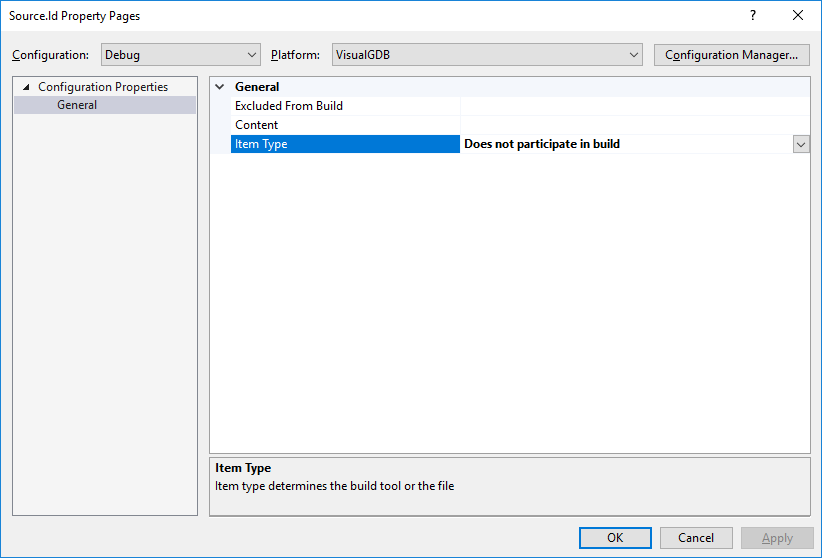
Attachments:
You must be logged in to view attached files.KeymasterHi,
We would advise switching the output to disassembly and checking the assembly code that got produced. Most likely the GCC optimizer has optimized out some instructions modifying global variables.
If this is the case, we would advise declaring those variables with the ‘volatile’ keyword to explicitly tell the optimizer that each access to them should be preserved.
KeymasterHi,
Please follow this tutorial to adjust the softdevice memory for Nordic devices: https://visualgdb.com/tutorials/arm/nrf51/softdevice_memory/
KeymasterHi,
This should normally be fixed by including the script in the template by adding it to the project before exporting it.
However previously you have mentioned that you cannot do this because the build system complains. Please provide us the details on any errors you encounter when you try to add the second script before exporting the template.
-
AuthorPosts