Sysprogs forums › Forums › VisualGDB › Using VisualGDB without Internet connection
- This topic has 3 replies, 2 voices, and was last updated 2 months, 3 weeks ago by
support.
-
AuthorPosts
-
August 10, 2026 at 10:50 #37354
TerryR
ParticipantHi,
I recently had a nearby lightening strike kill my Internet modem. While waiting for a replacement modem, I thought I would work on my VisualGDB solution. When I started it, all the projects in the solution failed to load. The output looked like…
System.Net.WebException: The remote name could not be resolved: ‘api.github.com’
at System.Net.WebClient.DownloadDataInternal(Uri address, WebRequest& request)
at System.Net.WebClient.DownloadString(Uri address)
at dh2.i[T](String b, String a)
at iv.t(String a)
at iv.f.e(Boolean b, String a)
at iv.f.u(String a, String b)
at fp2.g_2(ok3 a)
at qs.j(List1 d, List1 e, String b, Boolean& a, y83& c)
at qs.e()
at gb2.k_2_2_2_2_2_2_2_2_2_2_2_2_2(of3 a, rv b)
at vc2.o1(ToolchainSubtype a)
at rv..ctor(VisualGDBProjectSettings2 h, fc1 a, xz e, l g, ku3 c, IDELevelProjectInfoForBuilding f, AlternateDebuggerSetup b, String d)
at u04.h4(IDELevelProjectInfoForBuilding a)It appears that my projects won’t load because there’s no access to api.github.com. I can’t be certain if this is a Visual Studio requirement or VisualGDB; I see ‘VisualGDBProjectSettings2’ in the log output, so I’m starting here to ask if there’s any option ( I couldn’t find one ) to work in this IDE without an active Internet connection? I found and disabled every option setting related to github co-pilot, but it still wouldn’t load.
August 10, 2026 at 15:49 #37361support
KeymasterHi,
Thanks for confirming your license key. It was linked to another email address, and our system picked up an old license instead.
The error comes from VisualGDB trying to download the PicoSDK referenced by the project (or one of the tools required by the SDK). Normally, it would only happen if the project references an SDK version that is not present on your computer.
You can try creating a new project from scratch to see what SDK versions are available. If the project you are opening refers to a different one, it would not work without an Internet connection.
If it doesn’t help, please let us know the VisualGDB build number from the Help->About VisualGDB window, so that we could look further into what is going on.
August 10, 2026 at 16:45 #37362ParticipantHi,
Thanks for your response. Sorry about the email confusion; I never use the email that I use for banking and financial transactions on this kind of public forum; just paranoid.
O.K. so VisualGDB V6.1R3(build 5547). Pico SDK choices are 2.2.0 and 2.3.0; both located in c:\Users\me\.pico-sdk\sdk. The selected toolkit is in the same directory tree.
I had selected and have been using 2.2.0 for some time now. The 2.3.0 was added earlier today when I was evaluating VS Code with the Pico extension. So at the time of the Internet outage, only 2.2.0 would have been available.
I just did a test by unplugging the Ethernet cable, and the entire solution compiled O.K. Maybe during my installation of VS Code + Pico extension, it loaded something that was missing before?
In any case, since I can no longer reproduce the problem, I would say don’t spend any time on this; we can say “solved”.
Thanks again.
August 10, 2026 at 17:47 #37363KeymasterHi,
No problem, and good to know it works.
BTW, if you are looking into VS Code, feel free to check out the latest daily build of CodeVROOM. It’s a subset of VisualGDB that works outside Visual Studio (also on Linux/Mac).
It’s extremely lightweight (30MB download), doesn’t need installation, and has multiple improvements over the regular Visual Studio GUI. E.g. the Live Watch is integrated into the regular expression popups, so you can inspect the global variables with mouse while the target is running:
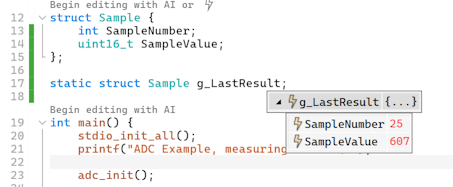
The last build is still missing a few pieces like plotting, but has all the major parts, and works with Pico SDK out-of-the-box. So, you can use VS Code with the Pico extension to get the latest versions of all tools, and still have the advanced debugging GUI from VisualGDB.
-
This reply was modified 2 months, 3 weeks ago by
Attachments:
You must be logged in to view attached files. -
This reply was modified 2 months, 3 weeks ago by
-
AuthorPosts
- You must be logged in to reply to this topic.