Good news, everyone. VisualGDB 6.1 is out of beta.
The main highlight of the release is the new AI-driven editing and refactoring engine, specifically designed for large C/C++ projects.
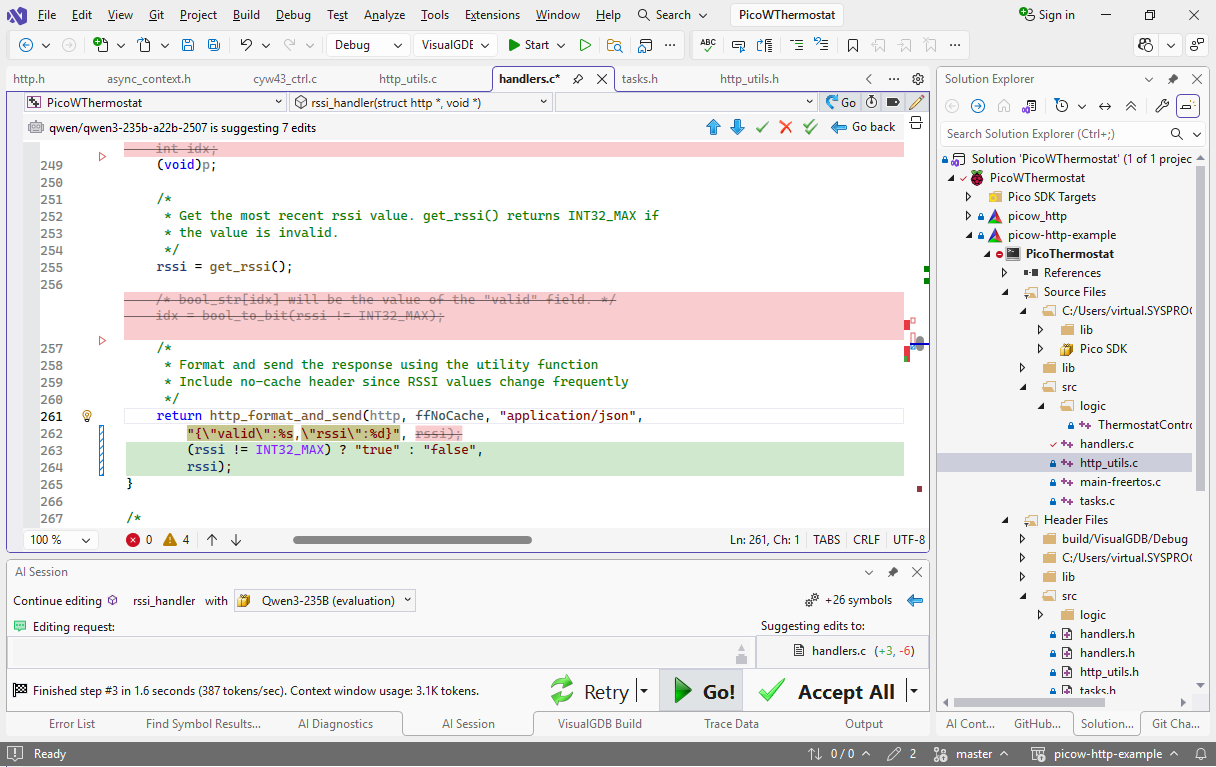
To demonstrate it in action, we took an open-source HTTP server for Raspberry Pi Pico W, and turned it into a very basic web-controlled thermostat using series of AI edits. Each AI edit was carefully saved as a separate git commit, preserving the prompt and model name, so you can browse them to see how it works.
Or, check out the 4 tutorials explaining every single step in detail:
- Refactoring Existing Code with AI
- Using AI Edits to Add New Functionality
- Using AI Edits to Create Similar Code
- Using AI to Simplify C/C++ Code
In summary, you can now use very brief prompts like this to quickly create new functions (together with auxiliary types) and update the existing code to use them:
+http_format_and_send() with varargs in @http_utils.c . take contentType + enum http_format_flags (ffNoCache).
measure with sprintf, then @pvPortMalloc + send + @vPortFree
This only took 3 seconds and produced a fully usable 60-line function on first try (see this tutorial).
The key difference from classic AI tools is that VisualGDB carefully tracks dependencies between individual symbols, so the AI gets to work with much smaller prompts, and can produce better results much faster.
There are numerous other improvements as well. New Smart Terminal GUI, better integration with ESP32, Raspberry Pi Pico, NRFConnect, minor fixes across the board and more.
You can download VisualGDB 6.1 here or use the Package Manager in VisualGDB itself.